
Store products
lifetime and yearly Plus.
The app can sell two things: a one-time lifetime Plus and a yearly subscription. You create them in App Store Connect and Google Play, then give the app their ids.
01What Plus unlocks
A helper can start a number of help sessions a month without Plus (a setting, default 3, counted on the helper's phone in calendar months, UTC). Plus removes that limit. The parent's own remote and the guided fixes are never locked. The paywall offers lifetime, yearly and Restore purchases.
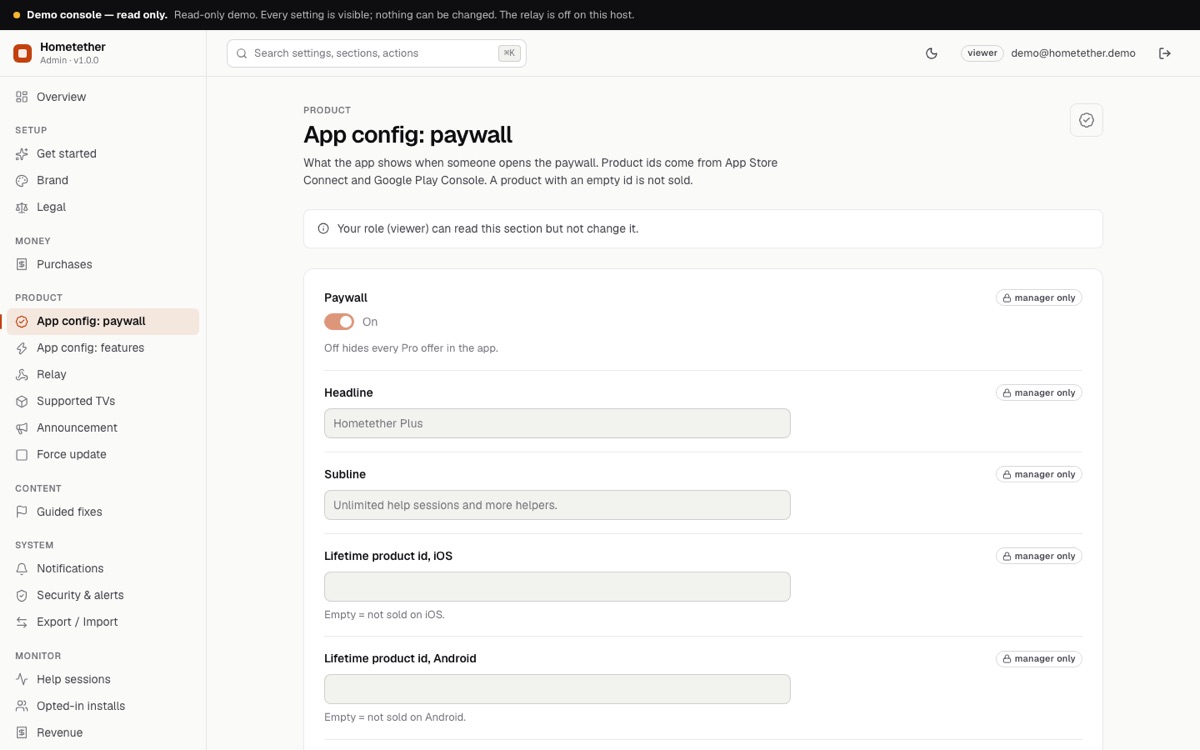
The default console subline reads "Unlimited help sessions and more helpers." In the code, Plus unlocks unlimited help sessions per month only; the number of helpers per family is a server limit for everyone (console, Relay). Edit the subline (console, App config: paywall) so it says only what you deliver.
No product ids are included. With empty ids the paywall shows "Not set up yet" and Plus cannot be unlocked: it never fakes a purchase. If you do not want to sell Plus, switch the paywall off in the console (App config: paywall) and every limit disappears.
02App Store Connect
- Create the app record with your bundle id (My Apps, plus).
- Open the app, then Monetization. Create a non-consumable in-app purchase for the lifetime product with an id you choose, for example
plus_lifetime(an id cannot be reused later). - Create a subscription group and an auto-renewable yearly subscription in it, for example
plus_yearly. - Set prices, names and the review screenshot for each, and accept the Paid Apps agreement and banking and tax forms. Products stay unavailable until these are done.
- Add the ids to the app (below).
- Test with a Sandbox tester account on a real iPhone before you submit.
03Google Play Console
- Create the app with your application id, and upload a first build to an internal test track (Play lets you create products once a build with the billing permission is uploaded; the app declares
com.android.vending.BILLING). - Monetize, Products, In-app products: create the lifetime product (one-time) with an id such as
plus_lifetime. - Monetize, Subscriptions: create the yearly subscription with a base plan billed yearly, id such as
plus_yearly, and activate the base plan. - Set up a merchant (payments) profile if Play asks for one.
- Add testers (Settings, License testing) and test from the internal track.
04Where to put the ids
| Way | How |
|---|---|
| In the console (no new build) | Console, App config: paywall: fill the four product id fields. They reach phones within about five minutes. Needs the server. |
| In the app code | app/lib/brand.dart: lifetimeIos, lifetimeAndroid, yearlyIos, yearlyAndroid. Used when no server config is reachable. |
Leave an id empty to not sell that plan on that platform. Real store purchases were not exercised by the author because no product ids exist in the source: test them yourself before release.
05Changing or removing a plan
Read from app/lib/src/services/purchases.dart. Check it against your wording before you change a live plan.
| You do this | What happens on the phone |
|---|---|
| Nothing (normal use) | After a verified purchase the app saves the kind (lifetime or yearly) and when the store last confirmed it. A yearly plan is trusted for 35 days after the last confirmation, and the app asks the store again when the last confirmation is older than 7 days. |
| A yearly subscriber cancels, or the subscription ends or is refunded | The store stops confirming it. Plus locks when the last confirmation is older than 35 days; the app does not know sooner. |
| You change a product id | Only purchases for ids in the current list unlock Plus. A restore under the old id is ignored. Keep the old id working or tell those buyers. |
| You empty an id or remove a plan | It disappears from the paywall. People who already bought keep what is saved on their device. |
| You switch the paywall off | Every copy that loads the new setting has no limits. Switching it on again limits people who never bought. |
| You want to give one person Plus | There is no per-person unlock. Use the store's own tools (offer codes, refunds) or switch the paywall off for everyone. |