
Relay
pairing, consent and limits.
The relay is the part of the server that passes commands from the helper's phone to the parent's phone over a WebSocket. It never talks to a TV and stores no command.
01Pairing a helper
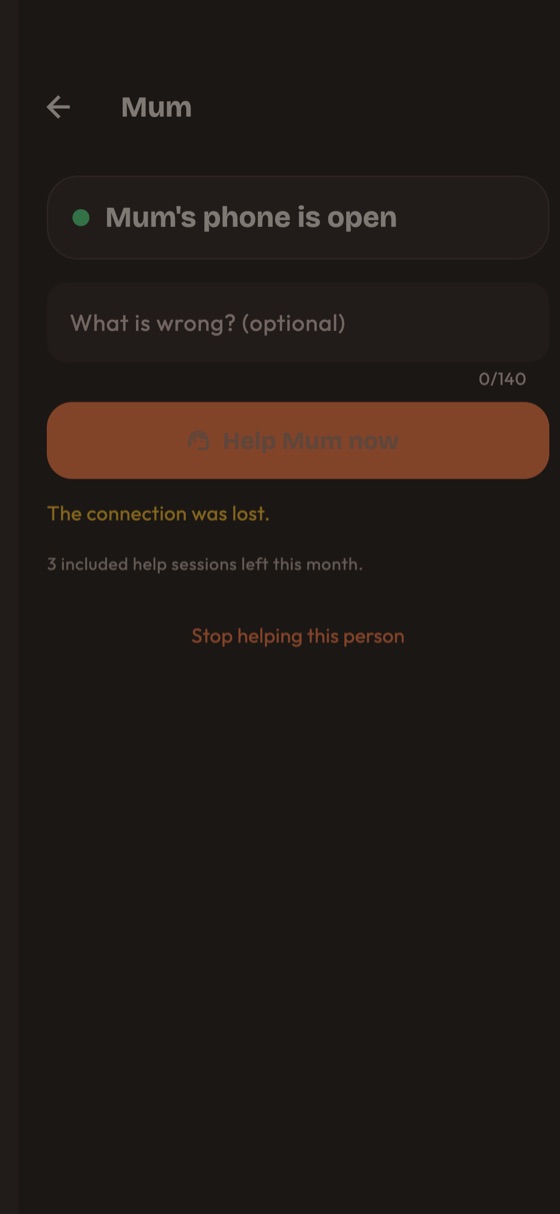
- The parent opens the app, taps "Ask family for help" and gets an 8-character code, also shown as a QR code. The code uses the symbols
23456789ABCDEFGHJKMNPQRSTUVWXYZ(no 0, O, 1, I, L). - The helper types the code or scans the QR code on their own phone ("Add a person").
- The code works once and expires (10 minutes by default). A second try, an expired code and an unknown code all answer the same way on purpose.
- Wrong guesses are limited per address: 10 a minute and 40 an hour. A parent can create 10 codes an hour per family, and an address 10 new families an hour (
contract/CONTRACT.md). - A family has one parent phone and up to 5 helpers by default (1 to 20 in the console).
- The parent can remove a helper at any time. The helper is disconnected at once and can never reconnect.
- The server stores only a hash of each code and of each device secret. Secrets are kept in the Keychain or Keystore on the phones.
02The consent rule
Enforced by the server and by the parent's phone:
- A helper can only ask. Nothing reaches the parent's phone as a command yet.
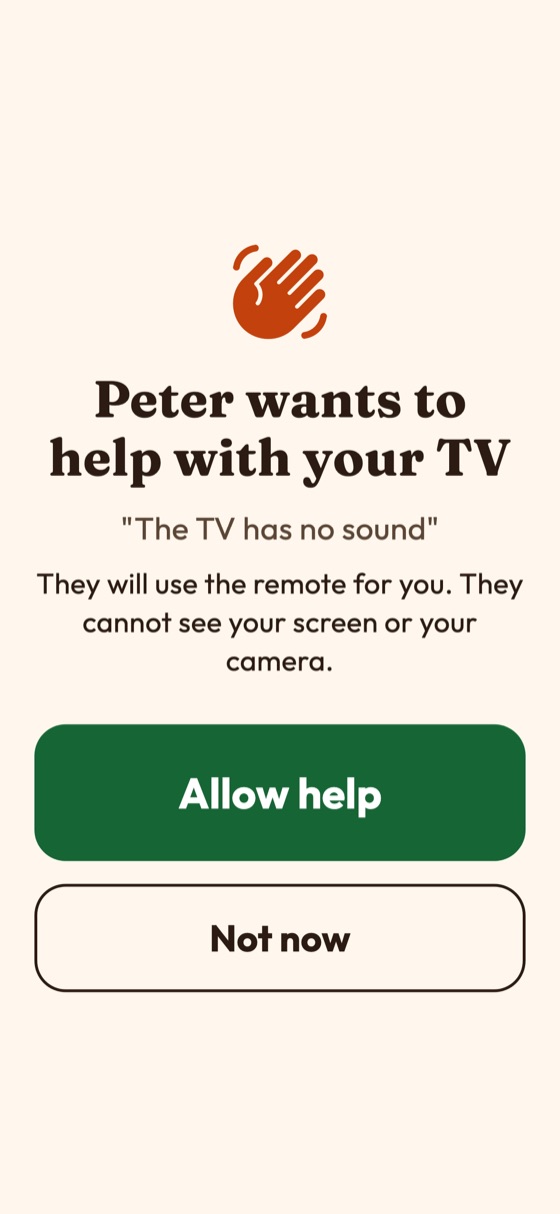
- The parent sees a full-screen Allow help question with big Allow and Not now buttons. No answer within 60 seconds counts as "not now".
- Only after Allow does the server open a session and mint a random session id and token. Every later command must carry them plus a rising sequence number; replays and wrong tokens are refused.
- A banner "<name> is helping" with a Stop button stays on the parent's screen for the whole session and cannot be dismissed. The parent's phone also refuses any command that arrives outside an open session.
- A session ends on Stop from either side, when the parent's phone disconnects, at the maximum length, after the idle time, when the helper is removed, or when you switch the relay off.
Only one session per family can run at a time.
03Limits you can change
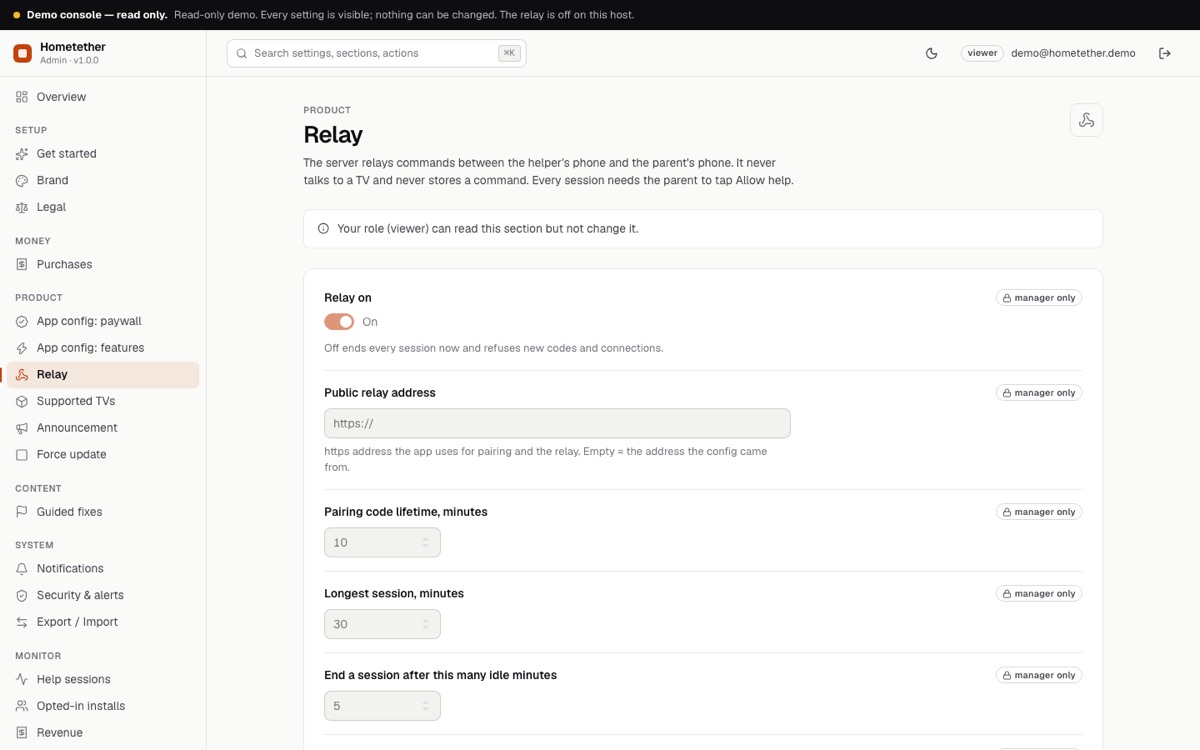
Console, Relay. Defaults and ranges from server/src/admin/manifest.ts:
| Setting | Default | Range |
|---|---|---|
| Relay on (master switch; off ends every session now and refuses new codes and connections) | on | on / off |
| Public relay address (https; empty = the address the config came from) | empty | URL |
| Pairing code lifetime, minutes | 10 | 1 to 60 |
| Longest session, minutes | 30 | 1 to 240 |
| Idle minutes before a session ends | 5 | 1 to 60 |
| Largest message, bytes | 4096 | 256 to 16384 |
| Commands per second in a session | 8 | 1 to 50 |
| Helpers per family | 5 | 1 to 20 |
| Sessions per family and day | 20 | 1 to 500 |
| Sessions at once, whole server | 200 | 1 to 5000 |
These server limits apply to everyone and cannot be bypassed from the app. The included sessions per month on the paywall page are different: they are counted on the helper's own phone.
04What the relay keeps
Nothing about the content of a session. Command bodies and results pass through memory and are never written to the database or the logs. A row with the family id, start time, end time and end reason is kept for 90 days, for the per-family limit and the counts in the console. Details: Privacy.
Traffic between each phone and your server is protected by TLS (wss). The session token is minted by the server. This is not end-to-end encryption: the relay can in principle see commands while they pass through. It stores none, but if you need a different trust model you must change the design.
05Hosting behind HTTPS and WSS
Run the shell commands on this page in WSL 2 (Ubuntu), not in PowerShell: install Node.js inside WSL for the server commands. Flutter can also run natively on Windows for Android builds; iOS builds need a Mac. macOS and Linux users can ignore this note.
In production the relay must be served over HTTPS and WSS. Put a reverse proxy with a certificate in front of the server (Caddy or nginx), then:
- Set
TRUST_PROXY_HOPS=1inserver/.env(one proxy you control), so rate limits and sign-in limits see the real address. - Pass WebSocket upgrades on
/v1/relay. - Raise the proxy's idle timeout above 60 seconds. The app sends a ping every 25 seconds.
- Build the app with
--dart-define=API_BASE_URL=https://your-domain. The app connects towss://your-domain/v1/relay. - Run one server process: sessions live in the memory of that process.
Caddy needs no extra WebSocket setting and gets certificates automatically:
api.example.com {
  reverse_proxy 127.0.0.1:8787
}
nginx (replace names and certificate paths with yours):
server {
  listen 443 ssl http2;
  server_name api.example.com;
  ssl_certificate     /path/to/fullchain.pem;
  ssl_certificate_key /path/to/privkey.pem;

  location /v1/relay {
    proxy_pass http://127.0.0.1:8787;
    proxy_http_version 1.1;
    proxy_set_header Upgrade $http_upgrade;
    proxy_set_header Connection "upgrade";
    proxy_set_header Host $host;
    proxy_set_header X-Forwarded-For $remote_addr;
    proxy_read_timeout 120s;
  }
  location / {
    proxy_pass http://127.0.0.1:8787;
    proxy_set_header Host $host;
    proxy_set_header X-Forwarded-For $remote_addr;
  }
}They are standard patterns, not tested by the author against this server (unverified). Test pairing and a session from two phones on different networks before you publish.
Check the proxy with curl https://api.example.com/healthz, which should print {"ok":true}.
06The demo host
The public demo console proxies plain HTTP only, so the relay (WebSocket) is off on the demo. Pairing and sessions cannot be tried there; run your own server to see them.
07Known limits
- The parent's app must be open to be reachable. There is no push notification to wake it, so a helper sees "phone is not open" and asks the parent to open the app.
- One server process, one disk: SQLite is not for several instances.
- The included sessions per month are counted on the helper's phone, so they are a soft limit; the per-family limits above are enforced on the server.